# What is TokenPolice (/docs)
**TokenPolice meters every LLM call your app makes, and stops the ones that cross a limit you
set — before the provider request goes out.** It is an SDK, not a proxy. Your coding agent
installs it from one sentence. Prompts never leave your servers.
## The problem, in one paragraph [#the-problem-in-one-paragraph]
Your provider bills per API key. Your business runs per user, per session and per workflow.
OpenAI and Anthropic can cap your account. They cannot cap the one free user who found your chat
box at 3am, or the agent that has been retrying the same tool call for an hour. Observability
tools can show you both, the next morning. A gateway can stop them — by sitting in your request
path holding your prompts and your provider keys. TokenPolice checks from inside your own
process, before the call goes out.
## What it does [#what-it-does]
### Monitor [#monitor]
* Cost per user, per plan, per session, per workflow, per model.
* Session and workflow drift against a baseline. "Expensive outlier" shows up here before it
shows up on the invoice.
* A trace for every run: each model call and tool call, what the prompt and response were made
of, and what each span cost.
* Alerts for traffic that arrives with no plan set, with a plan name your rules will not match,
or on a model with no price.
### Act [#act]
* **Block.** The call is never sent. $0.00 charged.
* **Reroute.** Switch the call to a cheaper model on the same provider.
* **Notify.** Slack, Discord, Telegram, email, a webhook, or the in-app inbox.
* **Loop detection.** The same prompt coming back inside a run, or a per-run cap in calls,
tokens or dollars.
* Every block and reroute rule starts in dry-run. Flip to enforce when the numbers look right. Notify has no dial: it fires whenever the rule matches.
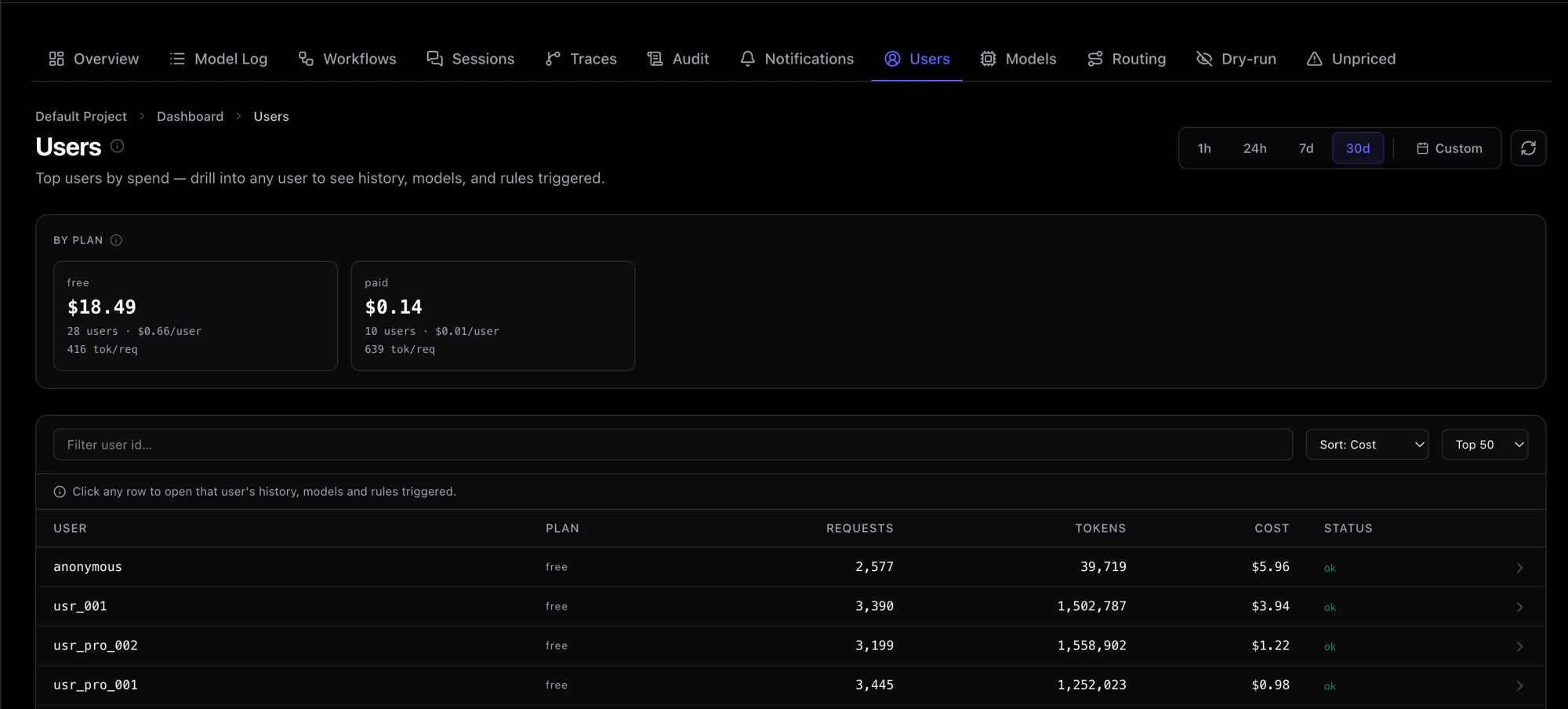 *Cost per user, per plan. The free tier is usually the surprise.*
## A rule, in one line [#a-rule-in-one-line]
*Cost per user, per plan. The free tier is usually the surprise.*
## A rule, in one line [#a-rule-in-one-line]
 *If `paid_plan` is "free", each `user_id`, 5 USD per month, Block.*
Every rule is the same three moves: filter the calls, set a limit, choose what happens at the
line. Limits are in dollars, tokens or requests, per hour, day, week, month, or a sliding
window. Seventeen templates cover the usual cases, three of them marked most common: cap spend
per user, stop at a total spend, and stop free-tier abuse.
## What it does not do [#what-it-does-not-do]
* It is not a proxy. Your request goes to the provider as before, with your key, unchanged.
* It never sees prompt or completion text. Token counts, model, cost, and the tags you choose
are [what leaves your servers](/docs/concepts/data-privacy).
* It does not switch providers. A reroute stays inside the same provider.
* It does not report money saved. It reports what it stopped.
* It is not a hard dependency. If TokenPolice is unreachable the check
[fails open](/docs/concepts/fail-open) and your call proceeds. The only exception it ever
raises is `TokenPoliceBlockedError`, and only on a block you chose to enforce.
## How it fits [#how-it-fits]
Your app, with the SDK inside it, calls the provider directly, with your key and your unchanged request. Token metadata goes sideways to TokenPolice: the model, token counts and cost, the identity tags you chose, the names you give your runs, and a content fingerprint used for loop detection. Raw prompt and completion text never leave your servers.
The SDK runs inside your process and instruments your LLM client. Before each call it checks
your rules and counters, and after the call it sends **token metadata** — the model, token counts
and cost, the identity tags you chose, the names you give your runs, and a content fingerprint
used for loop detection. Raw prompt and completion text never leave your servers, and the
provider request itself is not touched. The full field-by-field list is on
[Data & privacy](/docs/concepts/data-privacy).
## Your coding agent installs it [#your-coding-agent-installs-it]
You do not write the integration. Install the skill once, then say one sentence.
**Install the skill.** Once per coding agent. In Claude Code:
```bash
claude plugin marketplace add tokenpolice/skills
claude plugin install tokenpolice@tokenpolice
```
Cursor, Copilot, Codex or Antigravity: `npx skills add tokenpolice/skills -y` at the root of your
repo. [All install options](/docs/get-started/coding-agent/install).
**Say the sentence.**
> Integrate TokenPolice into this app.
The agent reads your repo, finds your LLM calls and where your user, plan and session values
live, and shows you a plan. It changes nothing until you say yes. Then it wires the SDK in
dry-run, you run your app once, and it checks that TokenPolice received your calls and
reports pass or fail. [What that looks like, line by line](/docs/get-started/coding-agent/walkthrough).
**Create a rule from a template, in dry-run.** Pick one from
[rule templates](/docs/rules/templates), leave it in dry-run, and watch the decision feed.
*If `paid_plan` is "free", each `user_id`, 5 USD per month, Block.*
Every rule is the same three moves: filter the calls, set a limit, choose what happens at the
line. Limits are in dollars, tokens or requests, per hour, day, week, month, or a sliding
window. Seventeen templates cover the usual cases, three of them marked most common: cap spend
per user, stop at a total spend, and stop free-tier abuse.
## What it does not do [#what-it-does-not-do]
* It is not a proxy. Your request goes to the provider as before, with your key, unchanged.
* It never sees prompt or completion text. Token counts, model, cost, and the tags you choose
are [what leaves your servers](/docs/concepts/data-privacy).
* It does not switch providers. A reroute stays inside the same provider.
* It does not report money saved. It reports what it stopped.
* It is not a hard dependency. If TokenPolice is unreachable the check
[fails open](/docs/concepts/fail-open) and your call proceeds. The only exception it ever
raises is `TokenPoliceBlockedError`, and only on a block you chose to enforce.
## How it fits [#how-it-fits]
Your app, with the SDK inside it, calls the provider directly, with your key and your unchanged request. Token metadata goes sideways to TokenPolice: the model, token counts and cost, the identity tags you chose, the names you give your runs, and a content fingerprint used for loop detection. Raw prompt and completion text never leave your servers.
The SDK runs inside your process and instruments your LLM client. Before each call it checks
your rules and counters, and after the call it sends **token metadata** — the model, token counts
and cost, the identity tags you chose, the names you give your runs, and a content fingerprint
used for loop detection. Raw prompt and completion text never leave your servers, and the
provider request itself is not touched. The full field-by-field list is on
[Data & privacy](/docs/concepts/data-privacy).
## Your coding agent installs it [#your-coding-agent-installs-it]
You do not write the integration. Install the skill once, then say one sentence.
**Install the skill.** Once per coding agent. In Claude Code:
```bash
claude plugin marketplace add tokenpolice/skills
claude plugin install tokenpolice@tokenpolice
```
Cursor, Copilot, Codex or Antigravity: `npx skills add tokenpolice/skills -y` at the root of your
repo. [All install options](/docs/get-started/coding-agent/install).
**Say the sentence.**
> Integrate TokenPolice into this app.
The agent reads your repo, finds your LLM calls and where your user, plan and session values
live, and shows you a plan. It changes nothing until you say yes. Then it wires the SDK in
dry-run, you run your app once, and it checks that TokenPolice received your calls and
reports pass or fail. [What that looks like, line by line](/docs/get-started/coding-agent/walkthrough).
**Create a rule from a template, in dry-run.** Pick one from
[rule templates](/docs/rules/templates), leave it in dry-run, and watch the decision feed.
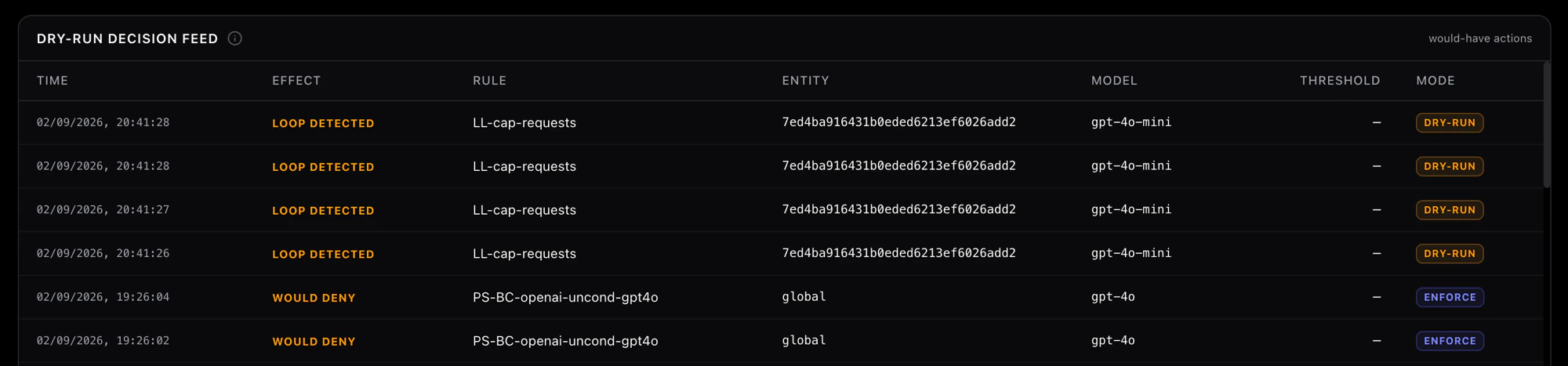 *The dry-run decision feed. Every row is a call a rule would have stopped. Nothing was.*
## Next [#next]
*The dry-run decision feed. Every row is a call a rule would have stopped. Nothing was.*
## Next [#next]